












According to the Flexera 2025 State of the Cloud report, 84% of organizations say managing cloud spend is their biggest cloud challenge, and cloud budgets run over by 17% on average. Most teams look for savings in pricing plans, reservations and instance sizes. Far fewer look at the application itself, even though in an autoscaling environment it’s the application that decides how many servers you run.
We saw this first-hand on TCAdvert, a digital signage platform we develop and run on AWS for IMS Sensory Media. Around 15,000 media players connect to its API every day. In September 2025, we moved that API from Apache and PHP-FPM to FrankenPHP with Laravel Octane, and the database that stores device events from Grafana Loki to VictoriaLogs.
This article covers why the classic stack stopped being enough, how FrankenPHP works, what worker mode asks of your team and what changed after a year in production. The biggest gain didn’t come from bigger servers but from changing how the application handles requests.
Why did IMS Sensory Media’s digital signage platform need to move off PHP-FPM?
With a few dozen devices, almost any architecture just works. With well over ten thousand, small inefficiencies start costing real money and engineering time. Before we get into the details, here’s what the migration changed.
| Area | Result |
| AWS Fargate tasks serving API traffic | 57% fewer at the same traffic |
| Device API response time (p95) | from about 350 ms to about 90 ms |
| Device log search | from ten seconds or more to about 0.5 s |
| Logging system migration | no data loss and no impact on the platform |
TCAdvert’s scale, with around 15,000 media players and tens of millions of logs a day
IMS Sensory Media is a sensory marketing and digital signage company listed on the Warsaw Stock Exchange. TCAdvert manages content on screens in more than 10,000 locations, from shopping malls to retail chains and brand stores. Every screen has its own media player, a device that syncs content, reports its status and sends logs to the central API, meaning events that occur on that device.
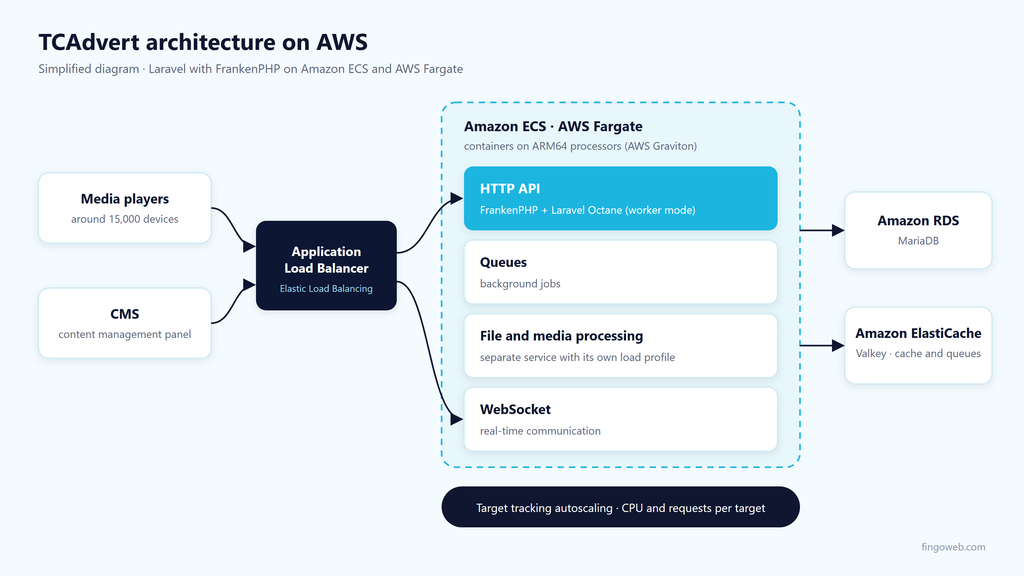
That is what makes systems like this different. Traffic doesn’t come from people clicking around an app but from thousands of devices that regularly poll the API and report events. At this scale, that adds up to tens of millions of log entries a day. The TCAdvert API is a Laravel application running on Amazon ECS with AWS Fargate on ARM64 processors (AWS Graviton), behind an Application Load Balancer. Traffic and workloads are split into separate services:
- HTTP traffic – the API that media players and the CMS talk to,
- queues for background jobs,
- queues for file and media processing – kept separate because their load profile is very different from the other jobs sent to the queues,
- WebSocket.
Data lives in Amazon RDS (MariaDB), while caching and queues run on Amazon ElastiCache (Valkey).
The number of tasks isn’t fixed. ECS scales them with target tracking, adding and removing tasks to hold the configured target values. We use three signals, average CPU usage, memory usage and the number of requests per target behind the load balancer. That detail changes how you think about performance. Anything that lets a single task handle more traffic automatically cuts the number of tasks you pay for.
How does FrankenPHP work compared to PHP-FPM?
To see where the savings came from, you have to look at how PHP handles a single request. The difference between PHP-FPM and FrankenPHP in worker mode isn’t a faster server. It’s a different execution model.
Why does PHP-FPM waste CPU under heavy traffic?
For years, the standard setup has been a web server, Apache or Nginx, with a pool of PHP-FPM processes next to it. The server accepts a request and passes it to a PHP-FPM process, which runs the script and returns a response. It’s a simple and reliable model, except that every request goes through the full application lifecycle from scratch:
- The PHP interpreter initializes.
- The autoloader and dependencies load.
- The framework boots and reads its configuration.
- The application opens its connections.
Only then does the actual logic run, and in an API that’s often a single database query and a JSON response. In an app the size of a typical Laravel project, this bootstrap overhead can match the time spent on business logic, and sometimes exceed it. OPcache helps by keeping compiled code in memory, but it doesn’t skip running the initialization code.
On ECS this had a concrete price. A large share of CPU went into repeated bootstrapping, so autoscaling crossed its threshold sooner and kept adding Fargate tasks. We were paying for the same startup work done over and over, not for handling real traffic.
FrankenPHP worker mode keeps your application in memory
FrankenPHP is a modern PHP application server built on top of the Caddy web server, combining the web server and the PHP runtime in a single process. Its most important feature is worker mode. The application boots once, when the worker process starts, and every following request hits a fully initialized framework. Database connections stay open between requests.
Think of a restaurant kitchen. PHP-FPM lights the oven from cold for every order, while worker mode keeps it hot all evening. The simpler stack mattered to us too, since one process replaces the web server and PHP-FPM pool pair, and Caddy brings cleaner configuration files and built-in zstd compression.
FrankenPHP vs PHP-FPM at a glance
The tables below compare PHP-FPM (with Apache or Nginx) against FrankenPHP in worker mode.
| Feature | PHP-FPM (with Apache or Nginx) | FrankenPHP in worker mode |
| Execution model | a process handles a request and returns to the pool | the app boots once and handles requests in a loop |
| Framework bootstrap | on every request | once, when the worker starts |
| Database connections | opened again for each request | kept open between requests |
| State between requests | always clean | persists and needs managing |
| Stack components | web server plus a separate PHP-FPM pool | one process (Caddy and the PHP runtime) |
The last two rows are the price you pay for the performance. We come back to them in the migration section.
Migrating to FrankenPHP with Laravel Octane on AWS Fargate
To connect Laravel to worker mode, we used Laravel Octane, which manages application state between requests. The change went live in production in September 2025. Swapping the server turned out to be the easy part. The code needed more attention.
How do you prepare a Laravel app for worker mode?
Under PHP-FPM, every process ends after a request, so global state, static variables and singletons always start from zero. In worker mode, the process lives on. A static variable set during one request is still there for the next, and a singleton registered in the container doesn’t go away. That’s where the performance comes from, and also where the bugs come from if your code assumes a fresh start.
Octane takes most of this off your plate by refreshing the container and selected services before each request. It doesn’t remove the responsibility entirely, though. Before migrating, review your own services for one thing in particular, whether they keep request-specific data somewhere that outlives the request.
Memory and worker restarts in long-running processes
Memory is the second issue. A process that keeps handling requests slowly collects small leaks nobody noticed under PHP-FPM, because there the process died moments later anyway. In worker mode, that process will eventually grow, so we restart workers periodically after a set number of requests.
FrankenPHP in production after a year. Results for IMS Sensory Media
Worker mode lowers CPU usage per request, so autoscaling crosses its thresholds less often. After the migration, the number of Fargate tasks serving API traffic dropped by 57%, and Fargate costs for that part of the infrastructure fell in proportion. We put the savings into other AWS improvements that made the CMS faster.
The second effect shows up in response times. For the API that devices talk to, p95 went from about 350 ms to about 90 ms. More important than the drop itself, response times became predictable. You’ll find the full project write-up in the case study on AWS infrastructure optimization for TCAdvert in our portfolio.
VictoriaLogs vs Grafana Loki for digital signage device logs
The second change touched a completely different part of the system, device logs. This time it wasn’t about cost but about the time the support team lost tracking down problems.
Why couldn’t Grafana Loki handle searching by player_id?
Every media player sends logs about content syncs, playback errors, status changes and incidents. When a screen in a shopping mall on the other side of the country stops showing content, the support team has to filter that one device’s history quickly and find the message that explains what went wrong.
Grafana Loki indexes labels only, not log content. Every unique label combination becomes a separate stream, so best practice is to keep only low-cardinality dimensions in labels. A device ID doesn’t belong there, because a separate stream for each of thousands of players would weigh down the whole system. We grouped devices into larger buckets instead, but pulling the logs for one player still ended in a scan of log content, which is exactly where Loki is slow.
Advanced queries took ten seconds or more, and longer in the worst cases. The configuration piled up workarounds that eased the symptoms without fixing the cause.
What changed after switching to VictoriaLogs?
VictoriaLogs is a log database from the makers of VictoriaMetrics, designed for high performance with low resource usage. Four things mattered in our case:
- full-text search without declaring upfront what you’ll search for,
- Bloom filters and time-based partitioning – the engine skips data blocks that can’t contain the search term, and removing old data comes down to dropping a partition,
- the player ID as a regular field you filter on directly,
- the LogsQL query language, which we query from the API and display right in the CMS, where the support team needs the logs.
Today a log query returns results in about 0.5 seconds, without adding resources. The support team can once again diagnose devices in real time.
Migrating logs without losing data with a dual-sink setup
Production logs can’t be recreated. If something gets lost during the switch, there’s no going back to collect it again, so instead of a hard cutover we used the pipeline we already had. The application sends logs in the OpenTelemetry format to Vector, which routes them to storage, so swapping the storage backend is a configuration change rather than an application change. The migration took five steps:
- We moved log shipping from Loki’s direct API to OpenTelemetry and set up the transport so a device resends logs if Vector doesn’t confirm receipt.
- We turned on disk buffering in Vector, which batches writes to the new storage.
- Using Vector Remap Language, we transformed logs into both the Loki and the VictoriaLogs format at the same time.
- For a transition period at least as long as Loki’s retention, the same logs went to both systems in parallel.
- After comparing both systems 1:1 on live traffic, we switched Loki off.
That meant we tested the new system on real data, not a synthetic benchmark. If VictoriaLogs hadn’t met our expectations, we could have stopped the rollout with no risk to the platform. As a side effect, the requests devices use to send logs got faster.
When does migrating to FrankenPHP make sense?
Apache with PHP-FPM and Grafana Loki are mature tools that are more than enough for a huge number of projects. We didn’t replace them because they’re bad. We replaced them because TCAdvert’s load profile went beyond the limits where their architecture works best.
Signs that PHP-FPM is no longer enough
Based on our case, we’d watch for three signs:
- lots of short, parallel API requests – especially when most of them are a simple database query and booting the framework takes about as long,
- CPU-based autoscaling that adds servers faster than traffic grows,
- a team ready to manage state in long-running processes – without that discipline, the gains from worker mode easily turn into hard-to-find bugs.
Projects where PHP-FPM is all you need
If your application has moderate traffic, doesn’t autoscale, or server costs aren’t a concern, the migration may not pay off. At a small scale almost any architecture just works, and reviewing code for worker mode costs your team time too. Start by measuring how much time your application spends booting on every request.


Frequently asked questions
What is FrankenPHP and how does it work?
FrankenPHP embeds the PHP interpreter directly into the Caddy server, which is written in Go, so the web server and PHP run as a single process. In worker mode, the application starts once and serves later requests from memory without reloading the framework. Without worker mode, FrankenPHP runs in a classic model similar to PHP-FPM.
How do you use FrankenPHP with Laravel Octane?
The simplest route is Laravel Octane, which supports FrankenPHP as one of its servers. In practice it looks like this:
- install Laravel Octane and choose FrankenPHP as the server,
- check that your services don’t hold request-specific data in static variables or singletons,
- set workers to restart after a set number of requests.
Octane takes care of resetting the container between requests.
Is FrankenPHP faster than PHP-FPM?
The server alone doesn’t make anything magically faster. The gain comes from worker mode, which skips booting the framework on every request. For us, the device API’s p95 dropped from about 350 ms to about 90 ms, but your results depend on how large your app’s bootstrap is compared to its actual logic.
Is FrankenPHP ready for production?
We think so, as long as your team understands what worker mode implies. FrankenPHP has been serving our production API since September 2025. Since May 2025, the project has also been officially supported by the PHP Foundation, and its code now lives in the official PHP organization on GitHub, which bodes well for its future.
How does VictoriaLogs differ from Grafana Loki?
Both store logs, but they index them differently:
- Grafana Loki indexes labels only, so searching high-cardinality fields such as a device ID ends in a scan of log content,
- VictoriaLogs lets you filter on any field and search full text, skipping blocks without the search term thanks to Bloom filters.
With around 15,000 devices, that difference decided it for us.