













Software subscription prices rose 12.2% in 2024, roughly four and a half times the 2.7% rate of general inflation, according to SaaStr’s breakdown of the 2025 price surge. For an integrator running signage across hundreds of screens, a per-screen fee climbing at that rate is a good reason to look at software nobody can reprice on you. That road leads to open source, and in digital signage it leads to Xibo first. Xibo has been developed openly for more than 15 years, reports close to 49,000 customers across 186 countries, and installs on a server you control for no licence fee at all. So the search for a Xibo alternative sounds like an odd thing to want.
You already have the free, self-hosted option every other comparison list points you toward, so what is left to want? The answer arrives once the screens go up. Free to download does not mean free to run: the players that drive Samsung, LG and most Android hardware are licensed per device, the AGPL licence limits what you can build on top and still keep, and someone on your team now owns a Docker server at two in the morning. For an integrator past a few dozen screens, the strongest Xibo alternative is a digital signage CMS you own outright: one with no per-device player meter, no copyleft strings on the code you add, and a supported product behind it instead of a weekend project. This piece maps what Xibo gives you, what it quietly costs, and the three directions you can take from there.
Xibo’s capabilities and its real cost
You cannot judge a Xibo alternative until you are honest about what Xibo does well, because it does a lot. This is capable digital signage software, with its costs tucked into places the download page never mentions.
Xibo’s strengths as a signage CMS
Xibo is built the way broadcast people think. A layout is a canvas split into regions, each region runs a playlist, and each item in that playlist is a widget drawn from one of forty-plus modules. Sitting over that is scheduling with real day-parting, priority rules for when two events collide, and ad-style campaigns where you enter the plays you need and the CMS works out the rota to deliver them. The parts cheaper tools skip are the ones Xibo takes seriously:
- DataSets turn the CMS into a small database. Load rows by hand, by CSV, or from a remote feed, then bind them to a layout, so a menu or a price board updates from data rather than a redesign.
- Proof of play records what played and when, aggregated by hour or day. That is the log any advertiser or landlord eventually asks to see.
- Synchronised playback holds a video wall in step to within a few milliseconds, with follower screens reporting through a lead to spare the server.
- A documented REST API, folders, user groups and per-feature permissions let one instance be carved up between teams and clients.
Feature for feature, that stands up against platforms charging real monthly money. The catch has nothing to do with capability.
The Xibo player license model
Here is what surprises people. The CMS is free, genuinely free, released under the AGPL and yours to run on unlimited displays without paying Xibo a penny, and the Windows and Linux players are free too. What costs money is the software that runs on the hardware most signage uses. Xibo's players for Android, Samsung Tizen and LG webOS are commercial, licensed per device, and you pay for them whether you self-host the free CMS or not.
Per screen the numbers look small, which is why they slip past at pilot stage:
| Player | Licence | One-off (perpetual) | Subscription |
|---|---|---|---|
| Windows / Linux | Open source (AGPLv3) | Free | Free |
| Android | Commercial, per device | from ~$28 | ~$18/yr or $1.50/mo |
| Samsung Tizen | Commercial, per device | from ~$85 | ~$72/yr or $6/mo |
| LG webOS | Commercial, per device | from ~$85 | ~$72/yr or $6/mo |
The perpetual option softens the blow, since you buy once and keep it, but a major version bump is billed again per device, and every commercial player checks in with Xibo's licence server every 30 days unless you buy the offline module for £150. Prefer not to host at all? Xibo in the Cloud rolls player access into a per-display subscription from £3.50 a month, rising through its Business and Enterprise tiers. Either way, the meter you opened source to escape is still running. It only moved from the CMS to the players.
The reasons integrators look for a Xibo alternative
Add those pieces up and a pattern shows. Integrators rarely start pricing a Xibo alternative over a missing feature. They start over three costs that grow with the deployment rather than shrink.
Per-device player licences that scale with the fleet
Twenty-eight dollars for an Android player is nothing on one screen. Spread it across a 300-screen chain, add a major-version upgrade every couple of years, and you are carrying a recurring, hardware-linked cost that never converts into an asset. Samsung and LG screens run roughly three times that per device. None of it buys equity in the platform; it rents the right to keep your own screens switched on, which is a strange position once the fleet is large.
The AGPLv3 copyleft ceiling
The second cost is legal, and it catches the integrators with the most ambition. Xibo's CMS is AGPL, and the AGPL carries a clause most open-source licences do not: the network-use provision. Modify the CMS and let clients use it over the web, and you owe those clients the source of your modifications. Run Xibo unchanged and you owe nothing. The bind arrives the moment you build the thing that makes your offer distinctive, a custom dashboard, a booking integration, a billing hook, and expose it as a service, because that work can no longer stay private.
- Fine under AGPL – hosting unmodified Xibo for clients, configuring it, and selling your setup and support around it.
- Not something you can keep closed – modifying the CMS and serving that modified version to clients over a network without publishing your changes.
For a reseller who wants a branded, proprietary product, that ceiling arrives early. Xibo's own white-label option rebrands the player for £150 a brand, which handles the badge but not the code underneath. Powerful software to build a business on, then, though not something you can quietly turn into your own.
The self-hosting and learning-curve burden
The third cost you pay in staff time. Self-hosting Xibo means running it in Docker, keeping it patched, backing it up, and taking the CMS offline for every major upgrade. Support is the community forum unless you are on a Cloud plan. And the software runs deep enough that new users feel it: Xibo's ease-of-use score on Capterra sits at 4.1 out of 5, the lowest of its ratings, with reviewers citing a steep curve and "many steps to do something simple." For a two-person integrator that overhead is real money, and it explains why a fleet already live on Xibo will still weigh a move. Doing that move without a technician visit to every site is its own discipline, which we covered in the remote migration playbook.
The three kinds of Xibo alternative
So what replaces Xibo? Search the phrase and you get lists of other free tools, one answer out of three and often the least useful. The real options split by how much you want to own against how much you want to run yourself.
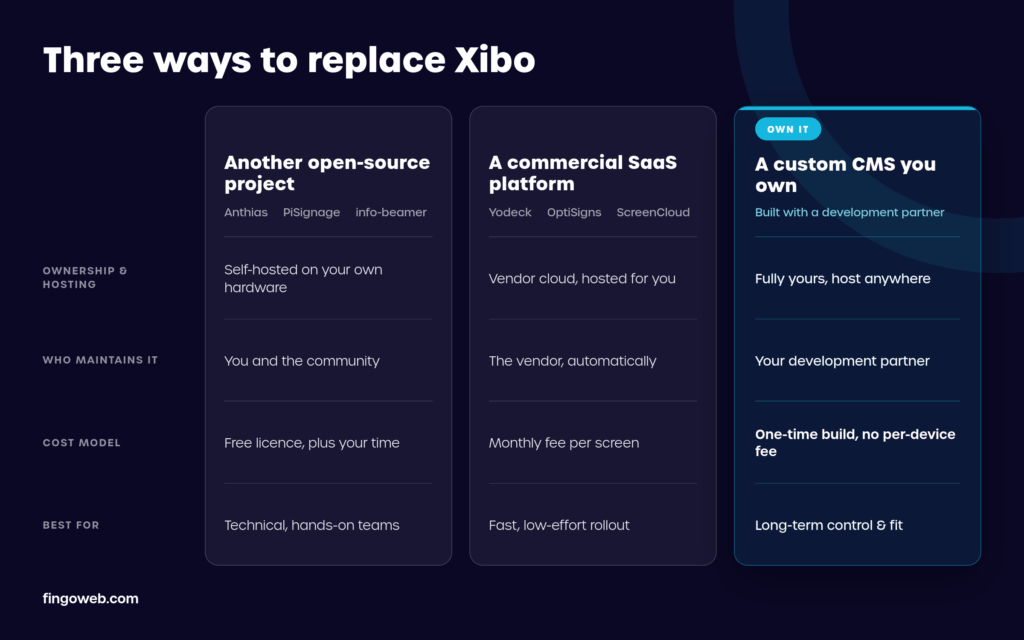
Another open-source project as Xibo alternative
The lateral move is to another open-source project. Anthias, the old Screenly OSE, is the popular one: a Raspberry Pi player that loops content on a single screen with next to no setup. PiSignage and info-beamer sit nearby, the latter a favourite of developers who like to script their walls in Lua. All three are lighter than Xibo, which is both the appeal and the limit, because none matches Xibo's scheduling depth, DataSets or multi-screen management. You trade capability for simplicity and keep the self-hosting you were trying to leave. Our roundup of the top open-source signage tools lines them up in detail. As a Xibo alternative, they fit a small estate with an engineer who enjoys the tinkering.
A commercial SaaS platform
The opposite move is to stop hosting anything. Yodeck, OptiSigns, ScreenCloud and Rise Vision are the cloud names an integrator meets most, and they are genuinely easy: a screen goes live in an afternoon, the vendor patches everything, and support picks up the phone. The trade is a return to a per-screen subscription on someone else's infrastructure, with the roadmap and the next price rise outside your control. For a client who never wanted a server, that is often the right answer. As a Xibo alternative it fixes the maintenance headache and reopens the recurring-cost one you may have left Xibo to avoid.


A custom CMS you own - Xibo alternative
The third path is the one the comparison lists skip, because there is no product to link at the end of it. You commission a CMS built for your business and own it outright. It sits between the other two: the on-premise control and the no-per-screen economics of open source, with the finished features and real support of a commercial platform, and none of the AGPL strings, because the code is yours from the start. A player built for you can run natively on Tizen, webOS or Android hardware with no per-device licence owed to Xibo or anyone else. Our write-up on ready-made versus custom signage software works through the build-versus-buy maths. For an integrator who resells signage or runs a growing fleet, this is the Xibo alternative that changes the economics: pay once to own a platform you can brand, extend and keep, rather than renting the right to run your own screens.
Matching Xibo with an owned CMS
Owning a platform only pays off if it does the daily work Xibo does. Two questions settle it: whether a custom build can match the feature surface, and the fleet size at which the sum comes out ahead.
The capabilities a custom build must cover
Clients never bought "Xibo." They bought the outcomes it produces, and those have to survive the switch. A credible build has to cover the same ground:
- multi-format content with a real template editor rather than a bare upload form
- scheduling with day-parting and per-site time zones
- multi-zone layouts and synchronised playback across grouped screens
- DataSets or an equivalent for live, data-driven content
- proof of play detailed enough to bill against
- a documented API, user roles and multi-tenancy so one instance serves many clients cleanly
Match that and you have parity. The reason to own rather than rent shows in what you can add on top: a link into a client's POS, ERP or booking system, an ad-serving hook wired to how the network earns its money. We built exactly that when we wired a programmatic SSP into a client's signage platform, the sort of work a fixed product files as a feature request and never ships.
The cost case and the signals to build Xibo alternative
On cost, the honest answer turns on scale and how long the screens stay live. A custom CMS is priced against features, not screen count, so once it exists, adding screens is close to free. Xibo runs the other way: the CMS costs nothing, but player licences, upgrades and either your hosting time or a Cloud subscription all climb with the fleet. Somewhere past a few hundred screens the lines cross, and the owned platform starts costing less every year the licence and subscription renewals keep landing.
Staying on Xibo is the right call more often than any vendor will admit. Keep it when the fleet is small, the content is simple, you have the ops capacity to host it, and the AGPL limits never bite. Look hard at building and owning when:
- the fleet is large or growing, and player licences plus hosting have turned into a real line item
- you resell signage and want a branded product the AGPL will not let you keep on Xibo
- you need integrations or hardware support no off-the-shelf tool offers
- the platform is part of your client offer, and its roadmap should be yours to set
Two or more of those, and the build tends to pay for itself inside a single refresh cycle. Choosing the partner then matters as much as choosing the platform, which is the subject of our guide on choosing a digital signage software company. A Xibo alternative earns its cost at one specific moment: when the free software has quietly filled up with per-device licences, copyleft limits and server maintenance, and owning the platform outright turns all three back into something you control.
FAQ - Xibo alternative
Is Xibo free?
The CMS is, and so are the Windows and Linux players, all under the AGPL with no cap on displays. What costs money is running Xibo on the hardware most signage uses. Players for Android, Samsung Tizen and LG webOS are commercial and licensed per device, and Xibo in the Cloud is a paid per-display subscription. Xibo is free to download and to self-host, and the cost starts once you deploy at scale on commercial screens.
How much do Xibo player licences cost?
Player licences are priced per device, with a one-off or a subscription route:
- Android – from about $28 per device as a perpetual licence, or roughly $18 a year
- Samsung Tizen and LG webOS – from about $85 per device perpetual, or roughly $72 a year
- Windows and Linux – free
Perpetual licences include minor updates, while a major version upgrade is charged again. Xibo has revised this pricing before, so confirm the current figures in the Xibo shop rather than treating these as fixed.
What is the best open-source Xibo alternative?
For a single screen or a handful, Anthias (formerly Screenly OSE) is the usual pick, a Raspberry Pi player far quicker to stand up than Xibo. PiSignage and info-beamer are the other names worth a look, info-beamer especially if you have developers happy to script content. Expect a step down in capability as well as price, since none of them matches Xibo's scheduling and multi-screen depth. Our open-source signage comparison sets them side by side.
Can I white-label or resell Xibo commercially?
You can resell it, within limits. Reselling hosting and support around unmodified Xibo is allowed, and Xibo sells a white-label option that puts your branding on the player for £150 a brand. What the AGPL blocks is modifying the CMS, offering it to clients as a service, and keeping those modifications closed. For a reseller whose value is a custom, branded platform, that constraint is what pushes them toward a CMS they own outright.
Do you have to self-host Xibo, or is there a hosted version?
Both exist. You can self-host the free CMS on your own server, which puts Docker, patching and backups on your team, or you can pay for Xibo in the Cloud, which starts at £3.50 per display a month and takes hosting off your plate. Self-hosting drops the subscription and adds the maintenance; the Cloud drops the maintenance and brings back a per-display fee. Neither removes the per-device player licences on Android, Tizen and webOS.
Is a custom-built CMS worth it compared with Xibo?
It depends on scale, as any build-versus-buy decision does. Below a few dozen screens, or where you have staff who enjoy running Xibo, a custom CMS is hard to justify. Past a few hundred screens, or where you resell signage and the AGPL blocks the product you want to sell, a one-time owned build usually costs less across its life and removes the per-device meter entirely. That break-even is the honest test of whether a Xibo alternative is worth commissioning.