













AI adoption in digital signage deployments reached 41% in 2026 – up from just 12% two years earlier, according to the State of Digital Signage 2026 report. The shift is not cosmetic. Content scheduling, audience measurement, and predictive maintenance are moving from manual dashboard workflows to automated, AI-driven processes. For integrators managing networks of hundreds or thousands of screens, the operational model is changing fast.
The pressure point is familiar: a CMS built for ten locations does not scale the same way when you manage fifty. Every new campaign requires form-filling across players, every diagnostic check means digging through logs, and every report needs manual queries. Digital signage AI agents – software assistants that connect to your CMS through APIs and protocols like MCP – can compress hours of repetitive dashboard work into single natural-language commands.
This article breaks down:
- what these agents are;
- what they can do in practice;
- what they mean for integrators building a digital signage CMS development business.
What is a digital signage AI assistant and how does it work?
The term “AI” gets attached to everything from playlist scheduling algorithms to full autonomous agents. Before evaluating whether digital signage AI belongs in your stack, it helps to understand what an AI agent actually is in this context – and how it connects to the CMS your clients already use.
From manual CMS to intelligent automation
A traditional digital signage CMS is a control panel. You log in, navigate to the right section, fill out forms, set schedules, assign content to players, and repeat for every location in the network. The interface assumes a human operator making one decision at a time. That works at small scale, but the math changes when an integrator oversees dozens of clients, each with their own screen fleet.
The bottlenecks are predictable and they show up in the same places across nearly every CMS:
- Campaign setup – selecting screens location by location, assigning creative assets, setting date ranges and playback frequency, then repeating for every venue in the network.
- Diagnostics – opening the player list, finding the right device, checking its status, switching to the log viewer, and scrolling through entries to piece together what went wrong.
- Reporting – navigating to analytics, setting filters, waiting for the data to load, exporting it, and formatting it before the client sees anything.
- Housekeeping – hunting for expired campaigns, orphaned media files, and inactive user accounts scattered across different CMS sections.
An AI agent connected to the same CMS replaces each of these with a single instruction.
Example: “Create a Christmas campaign – 60 screens across 15 malls, December 1-15, 10 plays per hour.”
The agent maps the request to the right API endpoints, finds the matching devices, sets the parameters, and holds for confirmation. The CMS data and business logic stay the same. What changes is the interface layer – from point-and-click to conversational. This kind of digital signage automation does not replace the CMS itself. It removes the bottleneck between knowing what needs to happen and making it happen across a large network.
The API layer: how digital signage AI learns your CMS?
An AI agent is only as capable as the system it can access. The connection between the agent and your CMS runs through APIs – typically REST endpoints that expose device management, content operations, scheduling, and analytics. The agent calls these endpoints the same way a frontend dashboard would, but instead of a human clicking buttons, the language model translates natural-language instructions into structured API requests.
The emerging standard for this connection is MCP – Model Context Protocol – an open specification created by Anthropic that standardizes how AI assistants interact with external systems. Think of it as a universal adapter: instead of building custom integrations for every AI platform, a CMS vendor publishes one MCP server, and any compatible AI client (Claude, ChatGPT, Cursor, or a custom-built assistant) can connect to it. The protocol handles tool discovery, authentication scoping, and structured input/output, so the agent knows exactly what operations are available and what parameters each one requires.
Several digital signage platforms have already shipped MCP support:
- Revel Digital – exposes its full REST API through a dedicated MCP server, enabling headless CMS control. Device monitoring, playlist creation, campaign scheduling, and analytics are all available to AI agents without touching the dashboard.
- Screenly – added MCP as a subcommand in its CLI (version 1.1.0+). AI assistants inherit the same permissions as the authenticated API token, keeping the security model intact.
- Xibo – offers a Claude Desktop-optimized MCP server with over 100 API tool integrations for its open-source CMS.
- Fugo – connects AI assistants to its cloud platform through MCP for content creation and playlist management.
- NoviSign – provides an MCP server available through integration platforms like Zapier, linking its CMS to AI workflows.
- Navori – following its acquisition of Signagelive, Navori has integrated AI-driven analytics and fleet management into its CMS, with computer vision-based audience measurement built into its STiX player hardware.
The pattern is clear: the API layer is becoming the primary interface for AI-powered digital signage, and MCP is the protocol that makes it vendor-agnostic. For integrators, this means an AI agent can work with multiple CMS platforms – provided those platforms expose their APIs through a standard protocol.
Custom AI models vs. third-party integrations (OpenAI, Claude, Llama)
Integrators evaluating digital signage AI face a build-or-buy question at the model level.
Question: Do you train a custom model that understands your specific CMS schema, or do you connect a general-purpose LLM and let the API layer handle the domain specifics?
For most use cases, general-purpose models like Claude, GPT, or Llama are the practical choice. These models already understand natural language, can reason about structured data, and know how to call APIs when given tool definitions. The CMS-specific knowledge comes not from the model itself but from the MCP server or API schema it connects to. When an operator asks "show me all offline players in Warsaw," the model does not need to have been trained on digital signage data – it needs to know which API endpoint returns player status and how to filter by location.
Custom fine-tuned models make sense in narrower scenarios: when the CMS uses proprietary terminology that confuses general models, when response latency matters at the millisecond level, or when data cannot leave the integrator's infrastructure for compliance reasons. An on-premise Llama instance fine-tuned on your CMS documentation can run entirely within your network boundary, avoiding any external API calls. But the development cost is several times higher than connecting a cloud-hosted LLM to an MCP server, and the model requires ongoing maintenance as your CMS evolves.
The practical starting point for most integrators is the API-first approach: a general-purpose model connected to well-structured CMS endpoints. It delivers results faster, costs less, and the digital signage AI agent can be up and running in days rather than months.
What can a digital signage AI agent actually do?
Theory is one thing. The real question for integrators evaluating digital signage AI is what changes on Monday morning – what tasks move off the operator's plate and how the day-to-day management of a screen network shifts.
Campaign cleanup and content management at scale
Every CMS accumulates dead weight over time. Expired campaigns that nobody archived. Media files uploaded for a one-off promotion six months ago. User accounts for employees who left the client's team. In a traditional workflow, cleanup means scrolling through lists, checking dates, and deleting items one by one. An AI agent handles this as a background task – either on a schedule or on demand.
The more impactful capability is campaign creation at speed. Instead of filling out forms screen by screen, an operator describes what they need in one sentence:
Operator: "Create a campaign for Black Friday, November 25–29, client X, all screens in shopping malls, 10 plays per hour."
AI agent: "Found 47 screens across 8 shopping malls. Parameters set: November 25–29, 10 plays/hour, client X creative assets. Confirm to save."
One conversation replaces what would normally mean opening the campaign builder, selecting locations one by one, and repeating the process for every venue. Other bulk operations follow the same pattern:
- Network-wide schedule change – "Shift all player operating hours to 8 AM–10 PM for the holiday season." Applied across every device in one pass.
- Targeted content swap – "Replace the summer creative on all outdoor screens with the autumn version." The agent finds matching playlists, swaps the asset, and logs the change.
- Automated housekeeping – "Remove all campaigns that expired more than 30 days ago and flag any media files not assigned to an active playlist." Cleanup that nobody has time for, done in seconds.
Integrators who already work with content automation for digital signage through data feeds and APIs will recognize the pattern: once the CMS exposes structured operations, digital signage automation becomes a matter of describing what you want, not how to do it.
Automated reporting and performance analytics
Reporting in most CMS platforms means navigating to an analytics section, setting date ranges, selecting filters, and exporting data – or writing SQL queries if you need something non-standard. An AI agent turns reporting into a conversation:
Operator: "How is the Coca-Cola campaign performing?"
AI agent: "3,500 of 10,000 planned impressions delivered (35%). Current pace: 700 per day. Projected completion: April 15. Deadline: April 30. On track with margin to spare."
No dashboard navigation. No manual calculations. The agent pulls data from the CMS analytics endpoint, computes the pacing, and delivers a summary the operator can forward directly to the client.
This changes the reporting relationship between integrators and their clients. Instead of generating weekly PDF reports – a task that consumes operator time and often arrives late – the integrator can offer real-time, on-demand reporting. A client asks about campaign performance, the operator queries the AI agent, and the answer comes back in seconds. That responsiveness strengthens the client relationship: clients who get answers in real time are harder to poach than clients who wait for weekly PDFs. For integrators managing multiple accounts, AI-powered digital signage reporting shifts from a scheduled chore to a service that actively retains business.
Proactive optimization: when AI spots what your team misses
The most valuable AI capabilities are not the ones operators ask for – they are the ones that surface problems before anyone notices. A digital signage AI agent monitoring CMS data continuously can flag issues that would otherwise go undetected until a client calls to complain.
Consider a real diagnostic scenario. An operator notices a screen in a shopping mall is not playing its assigned campaign. Instead of opening the CMS, navigating to the player, checking its status, then switching to the log viewer, the operator asks one question:
Operator: "Why is the player in mall X not playing the campaign?"
AI agent: "Player is online, but I found 47 timeout errors on the file coca-cola-summer.mp4 in the last three hours. Probable cause: slow network at the location or a CDN issue with that specific file."
Diagnosis that would take ten minutes of log browsing, delivered in seconds. The same conversational approach works for network-wide monitoring:
Operator: "Show me all offline players in Mall Y."
AI agent: "Found 3 offline players: Samsung 55" at the main entrance (offline 6 hours), LG 43" in the restaurant zone (2 hours), Samsung 75" near checkout (15 minutes – likely a restart)."
The agent does not just list the devices – it adds context. A 15-minute outage on a player that was previously online probably means a reboot, not a hardware failure. That kind of triage saves the operator from dispatching a technician for a non-issue.
Proactive monitoring takes this further. An AI agent running scheduled health checks can:
- Detect offline players – identify devices that have been unreachable for more than a set threshold and alert the operator with location details and likely cause.
- Flag content delivery failures – spot repeated download timeouts or playback errors before they affect campaign delivery.
- Identify underperforming slots – compare impression targets against actual delivery and warn when a campaign is falling behind pace.
- Track resource usage – monitor storage, bandwidth, and player memory across the network and predict when limits will be reached.
For integrators, proactive AI monitoring turns the support model from reactive firefighting into predictable, managed operations – the kind of service that justifies long-term contracts and higher margins.
What digital signage AI means for media integrators and their clients?
The technical capabilities matter, but integrators make investment decisions based on business outcomes. Digital signage AI changes the economics of network management, the competitive landscape, and the compliance requirements – all at once.
Reducing operational overhead for integrators managing large networks
The business case for AI in a digital signage CMS starts with operator efficiency. The day-to-day gains compound across every network an integrator manages:
- One operator covers more ground – tasks that required dedicated screen time (campaign setup, log review, report generation) become conversational queries. An operator managing five client networks can realistically handle eight or ten with AI assistance.
- Faster diagnostics reduce downtime – identifying why a player is offline takes seconds instead of minutes. Shorter downtime means fewer SLA breaches and fewer emergency calls from clients.
- Lower training barrier for new staff – a new operator does not need to memorize every CMS menu and workflow. They describe what they need in plain language, and the AI agent handles the navigation. Onboarding drops from weeks to days.
- Predictable support costs – proactive monitoring catches problems early, shifting the cost curve from expensive reactive fixes to cheaper preventive maintenance.
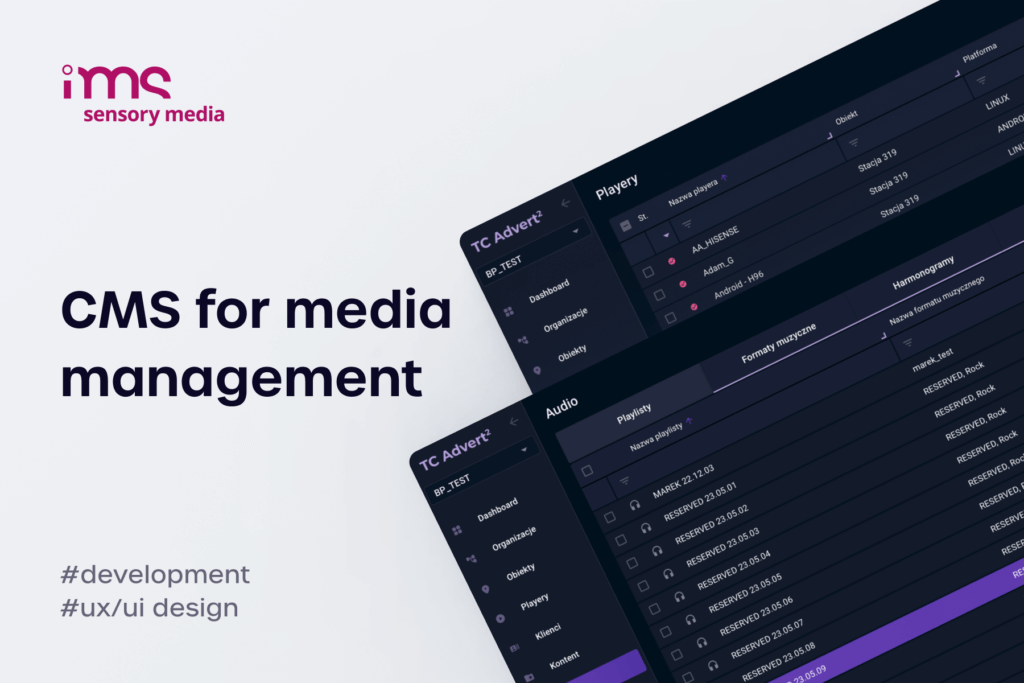
Integrators who have built their operations around a custom CMS already have the API infrastructure in place. Adding an AI layer – whether through MCP or direct API integration – is a development project, not a platform migration. For those working with a development partner to build a CMS with AI capabilities, the integration typically builds on existing REST endpoints rather than requiring a new architecture. The Broadsign and IMS integration case study shows how API-first design enables exactly this kind of extensibility – once your CMS speaks a structured language, connecting new consumers (whether SSP platforms or AI agents) is an incremental step, not a rebuild.

Positioning AI-powered CMS as a competitive differentiator
The digital signage industry is heading toward a point where AI-powered management will be expected, not exceptional. But that point has not arrived yet. As of 2026, no leading CMS vendor offers a fully integrated, production-ready AI assistant as a standard feature. The platforms that have shipped MCP support are early movers, and most deployments are still in pilot phases.
This creates a window for integrators. An integrator who offers AI-powered digital signage management today is not matching the market – they are ahead of it. In client pitches, this translates directly: "Our platform lets you manage your entire screen network through natural language. Your current provider requires you to click through dashboards for every change." That is a concrete, demonstrable difference that clients can evaluate in a live demo, not a bullet point on a feature comparison sheet.
The digital signage trends for 2026 point in the same direction: AI, edge computing, and data-driven content are converging. Integrators who invest in AI capabilities now build the operational muscle and the client trust that will matter when the market catches up. Those who wait will be retrofitting AI into workflows that were designed without it – always a harder and more expensive path.
Data privacy and GDPR considerations when using AI in CMS
Any AI system that touches operational data raises compliance questions, and digital signage networks are no exception. Integrators operating in Europe need clear answers for their clients about where data goes and who can access it.
The good news is that a well-architected digital signage AI agent does not introduce new data flows. The agent authenticates with the same credentials as a human operator and inherits the same permission set. If an operator account cannot delete campaigns, the AI agent using that account cannot delete campaigns either. Write operations (creating, modifying, or removing content and schedules) can require explicit confirmation before execution, adding a human-in-the-loop safeguard that satisfies most internal compliance requirements.
The audit trail is another advantage. Every action the AI agent takes is logged – the prompt, the API call, the response, and the outcome. This creates a more complete record than manual CMS operations, where an operator might make changes without documenting the reason. For GDPR specifically, the key question is whether personal data leaves the CMS boundary. If the AI model runs on-premise (a local Llama instance, for example) or if the CMS sends only anonymized metadata to a cloud-hosted model, the answer is no. Integrators should map the data flow for each deployment and document it as part of their GDPR processing records.
Integrators who adopt digital signage AI now and build compliance into the architecture from day one will set the standard their competitors will be forced to follow.
FAQ
What is digital signage AI?
Digital signage AI refers to artificial intelligence systems connected to a digital signage CMS that can manage content, schedules, devices, and analytics through natural-language instructions rather than manual dashboard interaction. These agents use APIs and protocols like MCP to read CMS data, reason about it, and execute operations on behalf of human operators.
How does an AI agent differ from a standard CMS?
An AI agent acts as an intelligent assistant that operates your CMS on your behalf, rather than requiring you to navigate it manually.
- Different interaction model – A CMS is a tool you operate through menus and clicks; an AI agent interprets plain-language requests and acts autonomously.
- Same infrastructure, smarter access – The agent connects to the same database and API endpoints as your CMS, but decides which ones to call automatically.
- No need to know the system – Instead of learning which menu or setting to use, you simply describe what you want and the agent handles the rest.
In short, a CMS puts you in the driver's seat, while an AI agent drives for you.
Can a digital signage AI agent work with existing players and infrastructure?
Yes. The AI layer sits on top of the CMS, not inside the player hardware. It communicates through APIs with the CMS, which in turn manages the players. As long as your CMS exposes REST endpoints or supports MCP, an AI agent can work with any player hardware – Samsung Tizen, LG webOS, Android, BrightSign, or Linux-based devices.
Is digital signage AI GDPR-compliant?
Digital signage AI can be GDPR-compliant, but it depends on how the system is architected.
- Inherited permissions – An AI agent operates only within the same access rights as the authenticated user account it represents.
- Human oversight & audit trails – Write operations can require human confirmation before executing, and all actions are logged for full auditability.
- Data boundary controls – Running the AI model on-premise or feeding it only anonymized data ensures no personal information leaves the CMS environment.
With the right architecture in place, GDPR compliance is fully achievable for AI-powered digital signage.
How long does it take to implement an AI assistant in a CMS?
For CMS platforms with existing MCP support (Revel Digital, Screenly, Xibo), a basic integration can be running within days – it is mostly configuration. For a custom CMS without MCP, building the API layer and MCP server is a development project that typically takes weeks to a few months, depending on the number of endpoints and the complexity of your data model.
Do I need to build my own AI model for digital signage?
No. General-purpose models like Claude, GPT-4, or Llama handle natural-language understanding and API calling out of the box. The domain-specific knowledge comes from your CMS API schema and MCP server definitions, not from the model itself. Custom fine-tuning only makes sense for specialized terminology, ultra-low latency requirements, or strict data residency constraints.