













Most integrators build their signage offering on the same short list of off-the-shelf platforms. When every competitor runs the same CMS, that platform no longer sets anyone apart, and it becomes just another recurring cost you pass along, with a vendor’s brand on the login screen. The market underneath is only getting more crowded: worth $28.8 billion in 2024, it is on track to reach $45.9 billion by 2030 according to Grand View Research. More screens, more integrators, and less to separate one from the next. That is where custom digital signage enters the conversation.
Custom digital signage changes that calculation. Reselling a subscription platform is the fast way into the market, and for many integrators it is the right way to start. It also caps your margin, ties your roadmap to a vendor’s release cycle, and puts a third party at the center of the client relationship you worked to win. For integrators past a certain scale and level of ambition, building custom digital signage software reshapes the economics of the whole business. For plenty of others it is the wrong call. This guide covers both: what a custom build includes, the signals that justify one, when buying is smarter, and how custom digital signage development works in practice.
Defining custom digital signage software
Custom does not have to mean writing every line from scratch. Most builds reuse proven components and spend the custom effort where it earns its keep.
Custom builds versus off-the-shelf platforms
Custom digital signage software is a content management system and player application built to your specification, rather than licensed as a ready-made subscription product. You own the codebase, the feature roadmap, and the deployment model. Off-the-shelf platforms like OptiSigns, Yodeck, or ScreenCloud give you a working system in minutes. A custom build gives you a system shaped around one operator’s exact way of working.
The trade is control for convenience. A subscription platform handles hosting, updates, and support, and you pay per screen every month for as long as you run it. A custom system moves the cost forward: more investment up front, then a codebase that is yours to extend, rebrand, and monetize. For a fuller side-by-side, see our ready-made versus custom comparison.
The components: CMS, player, and integrations
A digital signage system has three moving parts, and a custom project can touch any combination of them.
- The CMS – the web application where operators upload media, build playlists, schedule campaigns, and monitor screens. Most custom logic lives here: approval chains, multi-tenant client access, reporting shaped around how the operator sells.
- The player – the app running on each screen or media player that pulls content and plays it on schedule. Custom players matter when you support mixed hardware, need dependable offline playback, or target a specific display OS such as webOS, Tizen, or Android.
- Integrations – the links to everything outside the signage stack: POS systems, ERPs, ad-serving and programmatic platforms, live data feeds, single sign-on. This is usually the hardest capability to get from an off-the-shelf tool.
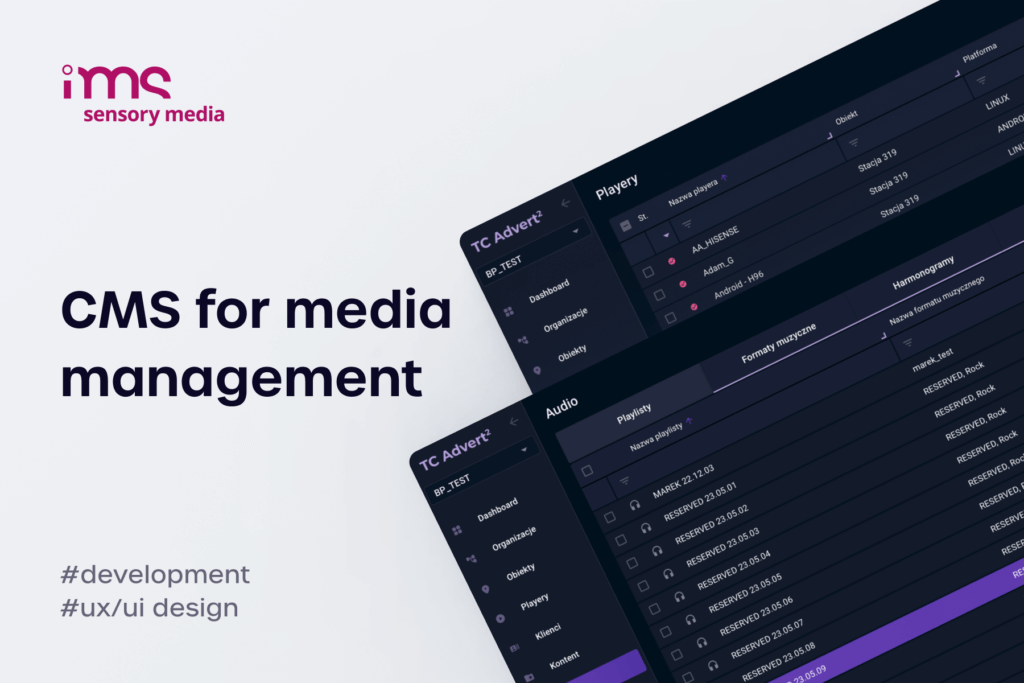
When Fingoweb built IMS Sensory Media's system, all three were custom: a from-scratch CMS, player apps across five platforms, and the API plumbing tying them together. Few projects need that full scope, but it maps the territory.
White-label as the middle path
Between reselling a subscription and commissioning a full build sits a third option that fits many integrators well. A white-label digital signage platform is a proven CMS and player that you deploy under your own brand and sell to your clients as your product. The development partner builds and maintains the core; you own the client relationship, set your pricing, and present a system that carries your name. It is how an integrator can offer custom digital signage to end clients without funding a ground-up build for every account.
White-label puts your brand and pricing on a platform the development partner builds and keeps running, so you get a product of your own without staffing a software team.
Signals that a custom build is worth it
The decision rarely turns on a single factor. It turns on how many of the following signals are true at once, and how strongly. One on its own seldom justifies a build. Three or four stacked together usually do.
The cost crossover point
Start with the money. Off-the-shelf platforms charge per screen per month, and that meter never stops. Industry pricing clusters around $11 to $20 per screen each month, with entry tiers near $7 and premium tiers well above $20. Easy to absorb across 50 screens. Across 2,000, it becomes the largest line in your operating budget.
The more screens you run, the more that meter costs you, and fleets only grow over time.
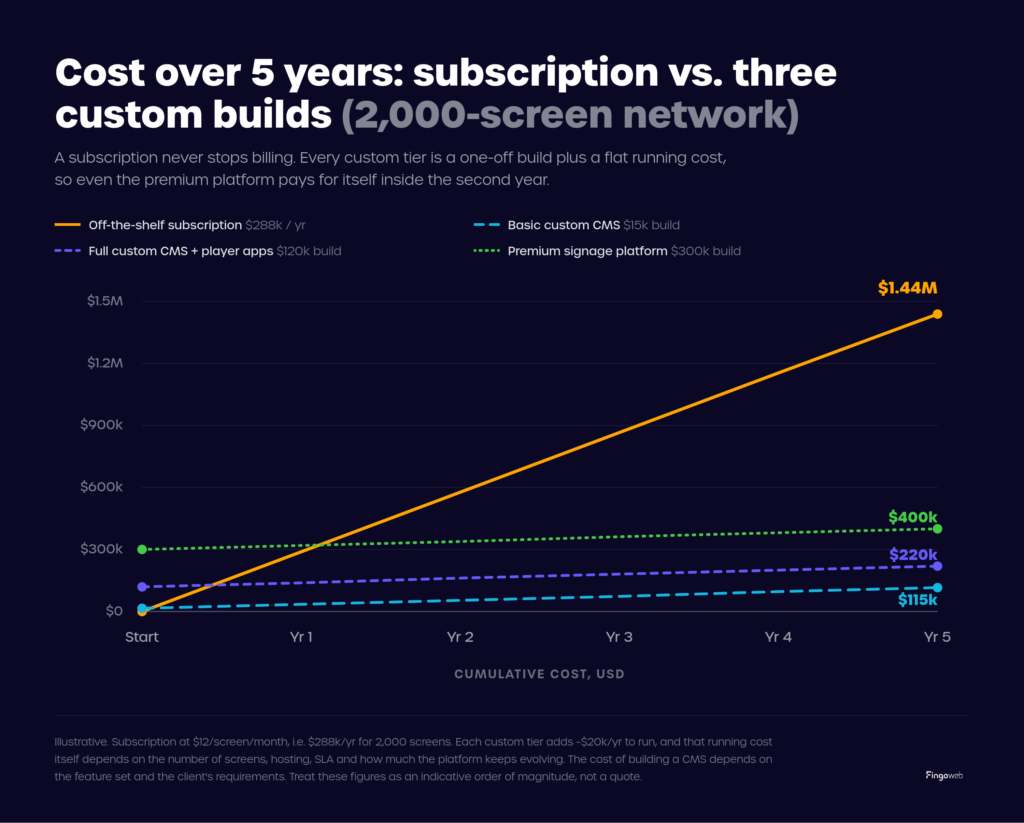
Custom changes the shape of your costs: a one-off build plus a flat running cost of about $20,000 a year for hosting, maintenance, and support. Where the build lands depends on how far you go:
- Basic custom CMS – a proven system rebuilt with your core features only, from around $15,000. You get content upload, playlists, scheduling, and screen monitoring on a single player platform, without custom integrations.
- Full custom CMS plus player apps – a complete system across your platforms, around $120,000. It adds player apps for several operating systems, offline playback, multi-tenant access, and reporting you can hand to clients.
- Premium custom signage software – a large, deeply integrated build, around $300,000. On top of that come integrations with POS, ERP, and ad-serving, single sign-on and compliance, and cross-screen sync at enterprise scale, the class of system behind the IMS build.
Set any of these against an off-the-shelf subscription that costs $288,000 a year at 2,000 screens. The subscription is cheaper in year one, but even the premium tier pays for itself inside the second year, and every year after that you keep the difference while the subscription keeps climbing.
Client demands off-the-shelf can't meet
Sooner or later, an enterprise client asks for something the platform cannot do. Every off-the-shelf tool draws a line around its feature set, and enterprise buyers have a habit of asking for things on the far side of it.
- Deep integrations – live inventory from a client's POS, pricing from an ERP, or programmatic demand from an ad platform. Fingoweb's integration of the BroadSign SSP with IMS's CMS is one example: programmatic ad buying feeding physical screens, which no generic tool offered out of the box.
- Bespoke workflows – multi-step approval chains, franchise-level content permissions, campaigns locked to a region or a daypart.
- Hardware and OS coverage – aging screens, mixed fleets, or a specific SoC platform an off-the-shelf player ignores.
- Compliance and data residency – SSO, audit trails, and on-premise hosting for clients who cannot sit on a shared public cloud.
Any one of these can decide an enterprise pitch. Winning that class of client often comes down to saying yes where your competitors, boxed in by their platform, have to say no.
Owning the platform and the revenue
Then there is the part that is harder to put on a spreadsheet: who owns the platform. When you resell a subscription, the vendor owns the product and you rent access to it. Your margin is the spread between their per-screen fee and your price, and they can compress it with a price rise whenever they choose.
A custom or white-label platform inverts that. You set the pricing, you hold the client data and the relationship, and the recurring revenue lands on your books. For an integrator building a book of multi-year contracts, that compounds. Owning the software means owning the roadmap too: when a client asks for a feature, you build it and bill for it, rather than filing a request with a vendor who may never act.
The per-screen fee you hand a vendor every month is revenue you could be keeping.
The wrong reasons to build custom software
Custom is not a default. Plenty of integrators talk themselves into a build that a subscription would have served better, and the mistake is expensive. Two situations call for restraint.
Small or standardized deployments
If your projects are small, short, or all alike, off-the-shelf is almost always the right answer. A 30-screen rollout of standard promotional content runs perfectly well on a dependable subscription with a quick setup. The per-screen fees stay low, the vendor absorbs maintenance, and your capital stays free for work that sets you apart. Bespoke software here is effort spent where clients see no difference, and they rarely pay a premium for it.
No appetite for ownership
Owning software is a commitment that outlives the build. Someone has to patch security holes, keep player apps alive through OS updates, run the hosting, and answer the call at 9pm when a screen goes dark in a client's flagship store.
A subscription folds all of that into one monthly fee. A custom build does not have to put it on your plate either: in the usual arrangement the development partner stays technically responsible for the software, shipping updates and fixing bugs, while you operate the system alongside the hardware at each client site, from shopping malls to gas stations. What building always asks of you is a commitment to that partnership and its cost. If you want none of it, and a standard platform keeps your clients happy, off-the-shelf is the honest choice.


The custom digital signage build process
If the signals point to a build, the next question is what you are committing to. A well-run custom digital signage project moves through predictable phases, and knowing them helps you budget time and money honestly.
From discovery to deployment
- Discovery and scoping – the partner maps your workflows, client requirements, hardware, and integrations, then agrees what to build custom and what to reuse. Scope creep is cheapest to kill here.
- Architecture and design – decisions on CMS structure, player platforms, cloud infrastructure, and integration points, plus the UX and UI for operators who will live in the system every day.
- Development – building the CMS, the player apps for each target OS, and the integrations, usually in iterations you can review as they land.
- Testing and pilot – proving playback accuracy, offline behavior, and cross-screen sync on a small live deployment before scaling up.
- Deployment and maintenance – rolling out across the fleet, then the continuing work of updates, monitoring, and support.
Cost, timeline, and the main variables
Scope drives the budget: the number of player platforms, the depth of integrations, offline and sync requirements, and the size of the fleet you deploy to.
The IMS project shows the upper end in practice. Fingoweb built a from-scratch CMS plus player apps across five platforms, with the LG webOS player alone now running on more than 2,700 devices across four generations of the OS, synchronized, offline-capable, and accurate to within 80 milliseconds on campaign start. On timelines, a focused single-platform build is often a matter of weeks to a couple of months, while a full multi-platform system with deep integrations like that one runs closer to six to twelve months. Beyond those ranges the exact figure depends on scope, but the entry point is low enough to put a focused build within reach of most serious integrators.
Ownership and the dependency you take on
Custom only delivers the control it promises if you own what comes out of it. The terms matter as much as the code: settle source-code ownership, documentation, and a clean handoff in the contract, so the system is yours to run, change, or move to another team later. Done right, a build becomes your own platform rather than a service you rent. Fingoweb's work for IMS is the model: the software runs as IMS's own proprietary system, TCAdvert, across their screens, carrying the client's brand rather than the developer's.
Ownership brings a dependency worth naming. A custom build swaps reliance on a SaaS vendor for reliance on whoever builds and maintains the software. In the usual model that partner carries the upkeep, patching security and rolling out fixes, while you run the system and the hardware for your clients. Treat it like any key supplier relationship, with documented code, a maintenance agreement, and a partner with enough signage history to still be there in year three, and the dependency becomes a strength you can plan around.
Choosing a development partner
Most integrators do not keep a signage software team in-house, which makes the development partner the single most important choice in the whole project. The gap between a partner who has shipped signage before and a generalist agency learning on your budget is enormous.
Look for direct digital signage software development experience over general software work. The hard problems in signage are specific: player reliability on cheap hardware, offline playback, sync across distributed screens, and API integrations between a digital signage CMS and ad-serving platforms. A partner who has already solved them saves you the tuition. For a fuller checklist, see our guide to choosing a digital signage software company.
Fingoweb builds custom digital signage software for integrators, from standalone player apps to full CMS-and-player systems, and offers it white-label so you can run it under your own brand for your own clients. The IMS Sensory Media build is the reference: a complete custom system now running across thousands of screens in several countries. If off-the-shelf is capping your margin or blocking a client requirement, a custom build is how you take back control of the product and the revenue.
FAQ - Custom digital signage software
What is custom digital signage?
Custom digital signage is software built for one operator's needs instead of sold as an off-the-shelf subscription. It usually covers both the content management system and the player apps on each screen, and the operator owns it outright: the code, the branding, the hosting, and the roadmap. Integrators turn to it when a ready-made platform limits what they can offer clients.
How do you create your own digital signage?
Creating your own digital signage means putting three things together: screens or media players to show content, the content itself, and a CMS to schedule and manage it all remotely. The quick route is a subscription platform you can configure in an afternoon. The route that gives you a product to sell is a custom or white-label build, where a development partner creates a CMS and player apps you own and brand as your own. Which one fits depends on scale, budget, and whether you plan to resell it.
How much does custom digital signage software cost?
Custom digital signage software starts from around $15,000 for a focused build and climbs with scope. The main cost drivers are:
- Player platforms – each OS you support (webOS, Tizen, Android, Windows, Linux) adds development and testing.
- Integrations – POS, ERP, ad-serving, and SSO connections are often the single largest cost.
- Scale and reliability – offline playback, cross-screen sync, and fleet monitoring add engineering time.
A single-platform CMS sits at the low end; a multi-platform system with deep integrations sits well above it.
When does it make sense to build custom digital signage instead of buying?
Building makes sense when several conditions stack up: a large screen fleet where per-screen fees have grown painful, clients asking for features or integrations off-the-shelf platforms can't deliver, or a strategic goal of owning the product and its recurring revenue. A single trigger rarely justifies it; three or four together usually do. For small or standard deployments, a subscription platform is the sounder economic choice.
What is white-label digital signage software?
White-label digital signage software is a ready-built CMS and player you sell under your own brand. A development partner builds and maintains the core platform, and you deploy it to clients as your own product, setting your pricing and holding the client relationship. For integrators, it delivers much of the margin and control of a custom build without funding development from zero.
Can custom digital signage software run on our existing screens and players?
Usually, yes. Custom player applications can be built for the operating systems your screens already run, so you avoid replacing hardware. Common targets include:
- Smart display OSes – LG webOS, Samsung Tizen, and Android-based screens.
- Media players – Windows and Linux boxes driving screens with no smart OS of their own.
A capable partner audits your fleet first, then builds players for the platforms you run. Fingoweb's webOS work for IMS, for example, supports four generations of the OS inside a single app.